Image

Blog
With 35,000+ hours printed so far this semester, the Innovation Co-Lab Studios' new fleet of Prusa CORE One 3D printers are a hit! We have loved seeing all your projects flying off the printer at 2x times the speed of the old printers. Whether it is a bright pink Labubu, a pipet stand for your lab, or a part of a machine you are creating for class, the Co-Lab is here to help you make it happen!
The printers have been great, but they have not been without some growing pains. Specifically, the process of clearing the 3D printer beds and preparing them for another print has been a challenge.


On the old printers, users could physically remove prints from the bed and then utilize the screen to "confirm removal" and prepare the printers to run another print.
On the new printers, there is no option to completely clear the printers from the screen. Even if the previously printed object is removed, the only way that the printer can know that it is ready for the next print is through a member of the Studio Staff marking it clear in 3DPrinterOS. Pressing the "reset" button on the machine will not do anything.
In the short term, staff are working on periodically clearing beds and preparing them for the next print. For the long term, The Co-Lab is working on a "Bed Clearing Kiosk" solution.

We deployed a Version 1 prototype of the Kiosk at the TEC Studio over the last couple of weeks. After some stress testing and getting some user feedback, we retired that version. Any good design process requires some iteration.
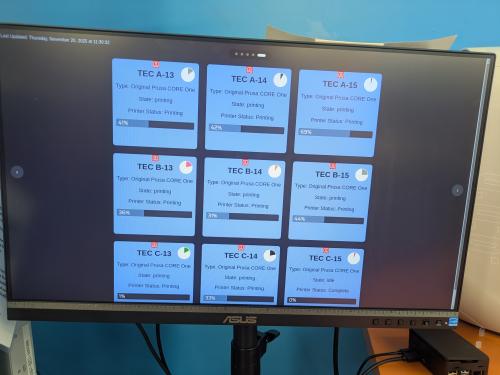
So we are now working on deploying the new and improved Version 2 of the Kiosk. There are still a couple of bugs that we are squashing, but we are making good progress and hope to have the Kiosk up and running soon.
We will be sure to keep everyone posted on the progress of the new Kiosk! In the meantime, here are some tips to help you get a 3D print job started on the Co-Lab fleet:
We appreciate your understanding, and we wish everyone happy printing!